Visit our global subsidiaries and distributors directory to find your local customer service contact information.







Account Creation & Management
Order Management
Product Return or Exchanges
Product Experience & Complaints
Lifetime Implant Warranty
Last Update: 8/24
As far as dental implants and restorative components are concerned the customer will have the rights and benefits foreseen in the “Lifetime Implant Warranty Program of the manufacturer”. The limitation of liability clause foreseen in Clause 8 of the referred manufacturer´s warranty shall apply to the extent permitted by the law applicable to these terms and conditions. The Lifetime Implant Warranty Program applies to all products implanted on or after January 1, 2016.
The Lifetime Implant Warranty Program referenced in condition above only covers the dental implants and restorative components listed in said program. Any other products distributed or supplied by ZimVie (including but not limited to products manufactured by third parties) are expressly excluded from the said warranty and the following shall apply:
- The products will have the manufacturing warranty according to the warranty document that accompanies each product, in the event that the product is not accompanied by a warranty document, the warranty offered by the manufacturer of the product as stated on its website.
- If during the warranty period the products are proven to be defective and it is covered by the relevant warranty, the customer must inform us immediately explaining the defects and returning to us the defective products. Before returning the products, the customer must sterilize the same.
- At our discretion and depending on the rights offered to each product Warranty, we may furnish defect-free replacements or issue a credit note or a corrective invoice for the value of the defective products. These shall be the sole remedies for the customers.
- If the products are proven to be defective, we shall bear the costs to return the products.
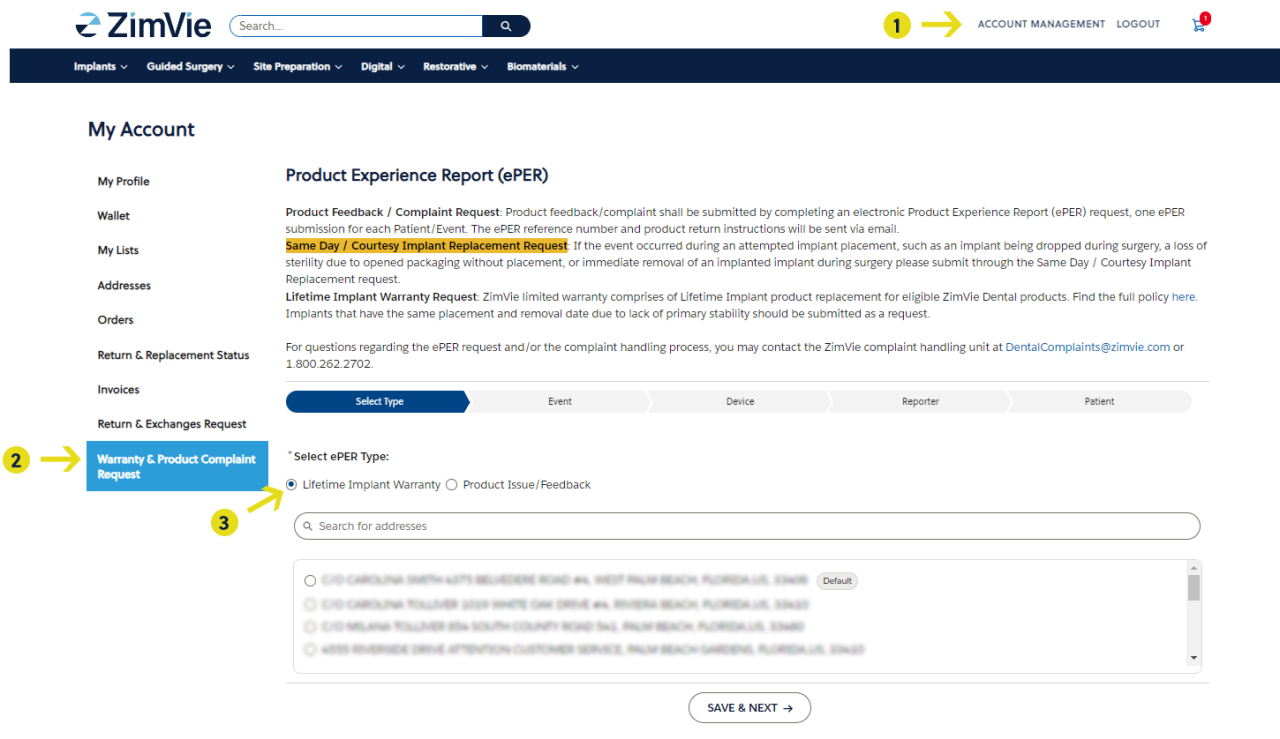
How to submit an online warranty claim via ZimVie eServices:
(Avaiable to customers in France, Spain, and Germany)
ZimVie eServices - If you aready have an active ZimVie eService account, please sign in. If you are new to ZimVIe and need to request an account, please register using the online registration form. If you already have an existing ZimVie account and would like to activate your ZImVIe eService account, please register using the online registration form.
1- Click on "Account Management", located on the top right of the navigation, to redirect you to your "My Account"
2- Find the "Warranty & Product Complaint Request" tab, located on the left navigation under "My Account", and click on the tab
3- Click on the "Lifetime Implant Warranty" and initiate your Warranty Product Experience Report (ePER)